























Avail newly launched offer by registering as a photographer or event planner — with a free branding page.
AI-Powered Photo Sharing

AI-Powered Photo Sharing Platform Designed for Everyone

Perfect for wedding photographers, event planners, party hosts, and celebration organizers. Create beautiful online photo galleries with PixOye and give clients a simple, fast, premium photo-sharing experience.

Join Our Community
Creators & Hosts

Who Benefits Most From PixOye?

Weddings with fifty guests or festivals with fifty thousand- when everyone's looking for their own face in the crowd, PixOye gives you the best solution. Use smart search, worry-free sharing, and tailored galleries to make photo sharing easy and premium, like your work.

Love Stories

Wedding Photographers

With PixOye, it's less sorting and more capturing. Stop drowning in thousands of unsorted shots from the wedding. Face recognition allows guests to spot themselves instantly.

Expeditions

Wildlife & Nature

PixOye turns your expedition photos and videos collection into something amazing. It enables encrypted sharing, sorted collections, and smart search with AI face recognition, plus many more features to manage high-volume shoots efficiently.

Studios

Product & Commercial

Share exactly what each client wants to see to set a high tone for your brand. Lookbooks, client proofing, product drops. When you keep your gallery professional, your work will look more organized.

Conferences

Event & Corporate

Big conferences and brand activations often pile up with huge photo archives. PixOye makes it effortless for guests to find their own photos. No ZIP downloads and no "has anyone seen my photo" texts—just instant images, exactly how your guests want them.

For photographers & event planners

Transform Your Memories Into Stunning Albums

PixOye helps you choose the best frames, skip duplicates, and draft a complete story of the day with ease. It arranges every page in an elegant template your clients will love.

  • Templates — Pixoye offers a collection of wedding, floral, party, magazine, birthday & more templates
  • Thoughtful Curation — Highlight portraits, group shots, and joyful moments
  • Ready-to-share PDF — Create, download, and deliver in minutes

Available on photographer & event planner accounts.

Personalize Your Favorite Moment Into a Beautifully Crafted Album

From soft wedding gold to glamorous party nights, editorial magazines and much more. Create stunning photos in every style.

Wedding Romantic
Floral Botanical
Party night Bold
Magazine Editorial
Birthday Celebrate
Modern Clean
Classic Timeless
Minimal Gallery
Wedding Romantic
Floral Botanical
Party night Bold
Magazine Editorial
Birthday Celebrate
Modern Clean
Classic Timeless
Minimal Gallery
PixOye Mobile

What's new

Our latest app update makes shared galleries sharper, more organized, and easier to share. Watch and share the photos effortlessly, whether you're on your phone or up on the big screen.

  • Client Favorites

    The photos that matter show up first across every gallery you share.

  • Facial Recognition

    Find exactly who you're looking for using quick, simple AI face recognition.

  • Large-scale Selections Made Easy

    Turn your favorite picks into brand-new events in a tap using Pixoye.

  • Easy Download

    Easy download option on your phone for quick, easier-to-share saves.

  • Latest First

    Recent photos and events stay right at your fingertips.

  • Delightful Moments

    Clean up and organize with a touch of PixOye magic.

  • Present on TV

    Cast your gallery up for receptions, reunions, and sneak previews.

Photographer using Apple Watch to trigger iPhone camera at a live event
New · Apple Watch

Get Access to PixOye from Your Wrist

With PixOye's Apple Watch companion, photographers and hosts can shoot event photos without pulling out their iPhone every few minutes. Pick an event and folder right on the Watch, tap Capture to your paired iPhone's camera, then tap Snap from your wrist to take the shot. All your photos drop straight into the upload queue, ready to go.

Pixoye is made for fast-moving shoots. Keep your hands free, capture quickly, and everything automatically aligns with the right event and account. A genuine advantage at live events, where speed matters just as much as getting the shot right.

  1. Pick the event & folder right from your Watch
  2. Capture launches the iPhone camera
  3. Snap from your wrist, sent straight to the queue
How it works ?

Getting started with PixOye is simple

PixOye makes photo sharing faster and saves photographers and event teams time and hassle. From your first upload to delivering photos to your guests, PixOye is designed to make everything smooth.

Photographers & Event Teams

From first upload to final delivery

PixOye is built for photographers, event organizers, schools, sports clubs, and corporate teams. It takes the stress out of uploading, organizing, sharing, and delivering photos—even when you have a huge batch to manage.
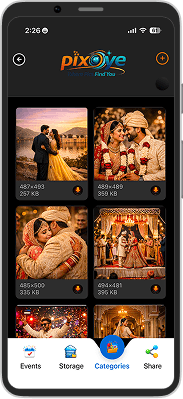
  1. STEP 1

    Create Event Gallery

    Start by creating an event gallery on the dashboard or mobile app. Organize your photos by occasion, client, team, or event before uploading them—whatever makes sense for you.

  2. STEP 2

    Choose How Guests Access Photos

    Share your full album with everyone using a single link, or turn on face recognition so each guest only sees the photos they're in. It's your choice.

  3. STEP 3

    One easy link—share it anywhere

    Send your gallery with WhatsApp, email, SMS, or QR codes—no complicated setup, no downloads, and no need to send invites one by one.

  4. STEP 4

    Measure engagement and manage access

    Monitor your gallery activity, tweak sharing settings, and adjust who can view the photos—all from your dashboard. That way, you know your pictures are reaching the right people.


Guests & Individuals

Get Easy Access to Photos

No matter if you’re at a wedding, sports meet, school function, or corporate event, PixOye makes it simple to access shared photos and quickly find your special moments—without having to scroll through endless albums.

  1. STEP 1

    Receive and open your invite

    Click the PixOye link your photographer or event organizer shared. You can open it right in your browser or use the PixOye mobile app to view your event gallery.

  2. STEP 2

    Verify access when required

    Privacy is our utmost priority. When prompted, enter the OTP sent to your phone or email—once verified, only authorized guests can view the photos.

  3. STEP 3

    Find your moments instantly

    PixOye helps you find your photos instantly. Instead of scrolling through thousands of pictures, you’ll be matched directly with the moments you’re in.

  4. STEP 4

    Download, save, and return anytime

    Download your favorite photos to your device, or keep them saved in the app so you can revisit your shared galleries anytime.

Direct from camera

Upload, share, and let guests find their photos easily.

With Pixoye, you can forget about memory cards and time-consuming uploads after the event. Your photos go straight from your camera workflow to the cloud, so guests can relive the moments while the excitement is still fresh.

  • Deliver photos in real time — your galleries update automatically as new images are added.
  • Share one easy link with everyone — offer the full album or let guests access just their own photos with face recognition.
  • Perfect for busy events — whether it’s a wedding, a sports game, a school function, or a corporate shoot.

New · Google Drive SYNC

Share your photo galleries straight from Google Drive—no extra copies or messy duplicates needed.

Your files stay right where they are. Just connect your Google Drive, pick a folder, and PixOye turns it into a guest-friendly gallery with easy sharing, mobile access, and face matching.

Your photos never leave your Drive. PixOye simply takes care of the viewing, guest access, and gallery delivery for you, all behind the scenes.

  • You manage your files in Drive, and guests see them through PixOye—no need to juggle files in different places.
  • Share one simple gallery link and give everyone an easy, branded viewing experience—on any device.
  • Add new photos to your Drive folder anytime, and they’ll show up instantly in your gallery—no extra work needed.
Why choose PixOye ?

Built to handle piles of photos, not just storage

Whether it’s a wedding, a school event, a sports tournament, or a corporate gathering, PixOye helps you organize, deliver, and find photos in less time—no tedious manual tagging, just an easier way to relive the moments. It’s a big step up from traditional galleries.

Find Faces Fast

Guests find their photos in seconds. PixOye picks out the right faces from huge galleries, so no one wastes time searching. Everyone gets a better, more personal viewing experience.

Share Galleries Instantly

Just send out one share link, and your guests can start viewing photos right away—on any device, with no complicated setup or download needed.

Effortless Event Organization

Keep everything organized as your photo library grows—separate events, teams, clients, and albums with clear folders to keep everything simple.

Storage That Fits Your Workflows

Upload your photos straight to PixOye or connect your Google Drive. You don’t have to change the way you work—deliver a gallery that looks polished and feels premium.

A Great Experience on Any Device

Every gallery is designed to work beautifully on phones, so your guests can easily browse, find, download, and revisit their favorite photos from anywhere.

Shared Memories, Lifetime Happiness

Preferred choice for different kinds of events

From weddings and school functions to sports tournaments and brand activations, PixOye helps organizers, hosts, and photographers share and deliver photos quickly and securely. Flexible sharing controls, expiry management, smart delivery tools, and simple guest access make every gallery easier to manage.

20K+

Users

360k+

Events Created

900M+

Photos Processed

13M+

Guest Served

Testimonials

See Why People Love PixOye

Real stories from hosts and guests who use Pixoye to share event photos the smart way.

5.0

2+ Reviews

Customer experiences that speak about Pixoye — where pics find you.

5.0

Before PixOye, managing photos after weddings took me days, sometimes even weeks. Now I upload the pictures, share one link, and guests find their own photos in minutes. PixOye has made my job so much easier. ”

Wedding Photographer - Gaurav

Jaipur, India 26 Mar 2027
5.0

Pixoye has completely transformed how I deliver photos to my clients—no more manual sorting or sharing headaches. With AI-powered face recognition, my clients instantly find their pictures, making my service faster, smarter, and more professional.

School Event Coordinator - Ashish Ubha

Banglore, India 12 Apr 2026
Subscription Plan

Choose Your Perfect Plan

Pick a plan that fits your storage and sharing needs. You can change or upgrade later.

Monthly Annually
Features
Cloud storage
Active events
Photo uploads
Bulk uploads
In-camera cloud delivery
AI face matching
AI photo preset edits
Portfolio categories
Team management
Watermark controls
Custom branding
Storefront & featured listings
Starred highlights
Guest share links
Mobile app
Free
Free
Free forever
1 GB
2
1000
—
50
—
—
—
—
-
—
—
Full and Matched
Included
Silver
$159.99 /per year
Startup
300 GB
200
100000
-
Unlimited
-
15
-
Full and Matched
Included
Buy
Diamond
$399.99 /per year
Diamond
1 TB
Unlimited
500000
Unlimited
5000
Unlimited
Full and Matched
Included
Buy
FAQ's

Frequently asked questions

Answers about sharing links, face match, privacy, and how Pixoye helps you deliver event photos to the right people.

Contact us

Yes. Guests can view shared galleries using a link. With face matching activated, they can upload a selfie and discover matching photos without creating a separate PixOye account.

PixOye is particularly designed for large events and supports thousands of photos in a single gallery. It performs well at weddings, school functions, sporting events, and corporate events.

Yes. You can control who can access your photos, require OTP verification, set an expiry date, and manage download access. This gives you better control over how your event photos are shared.

Absolutely. PixOye galleries are optimized for smartphones, tablets, and desktops. That way, guests can browse, match, and download photos easily from any modern device.

PixOye works for weddings, marathons, school events, conferences, sports tournaments, graduations, corporate activations, and any occasion where large numbers of photos need organized delivery.

Get the App

Available now on iOS and Android

Get the app from:

Pixoye App